Building Custom AI Review Dashboards for Production LLM Monitoring
anterior · Healthcare · 2025 · source Agentic: no · promotional bias: low · source-backed · extracted with prompt 0.5.5 (schema v2)
Generated from extraction.json — do not edit by hand. Every claim cites verbatim source evidence; stated means the quote directly asserts the claim, implied means it supports it indirectly.
Problem
Domain: Production LLM monitoring for healthcare decisions
Anterior needed a way for clinicians to review high-stakes AI-generated medical decisions at production scale, understand whether the system was performing well, and turn review findings into concrete product improvements. Generic spreadsheets or review tools could not expose multi-step traces, clinical context, failure modes, and improvement actions in a workflow fast enough for domain experts.
Constraints:
- The workflow involved healthcare decisions where domain experts needed guidelines, medical evidence, and AI outputs in one review context.
- Review quality and review speed both mattered because a small clinical team needed to review over 100,000 decisions.
- The dashboard had to surface enough context without overwhelming reviewers or causing context switching.
- Review outputs had to become actionable data for prompts, knowledge base updates, regression datasets, and bug reports.
- Existing spreadsheets and generic tooling limited data views and made it hard to translate review output into system improvements.
Architecture
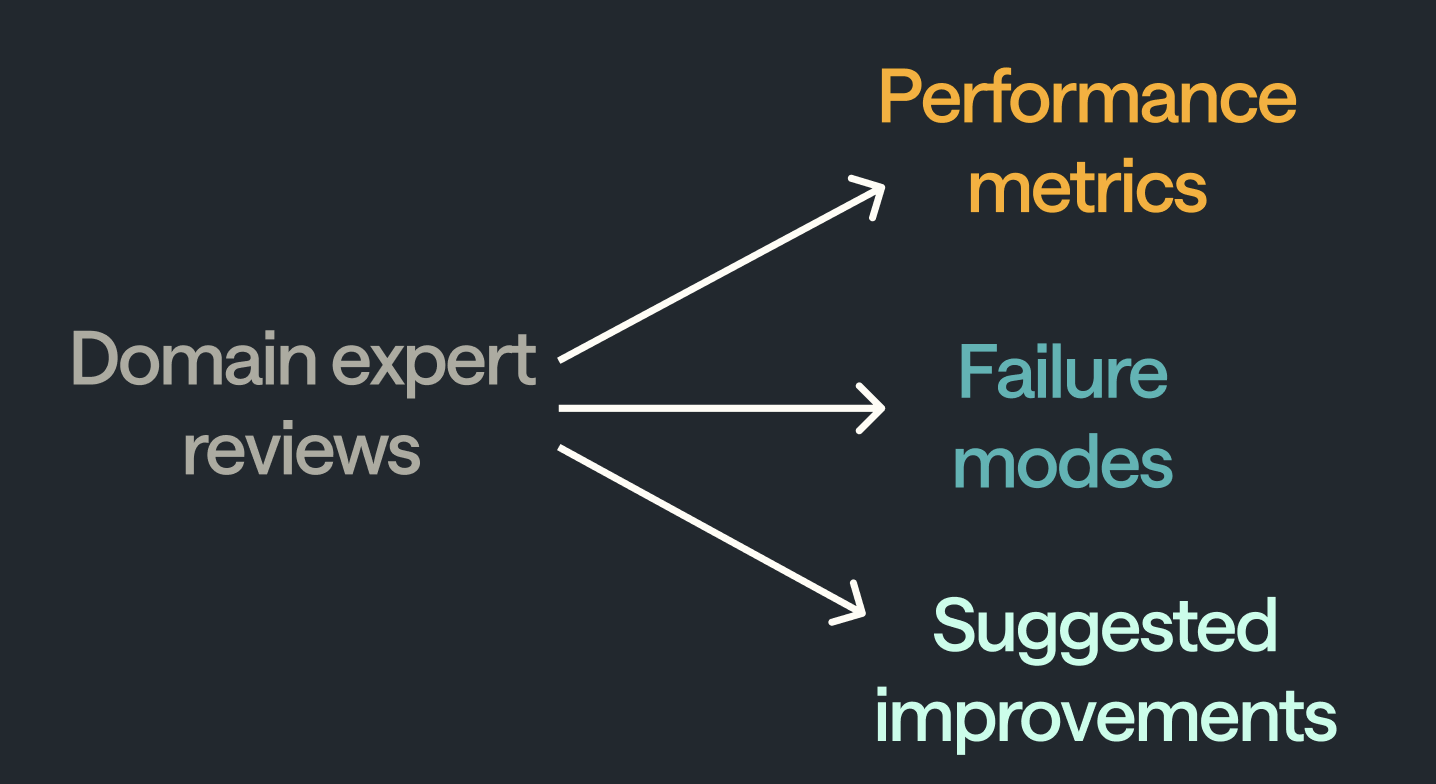
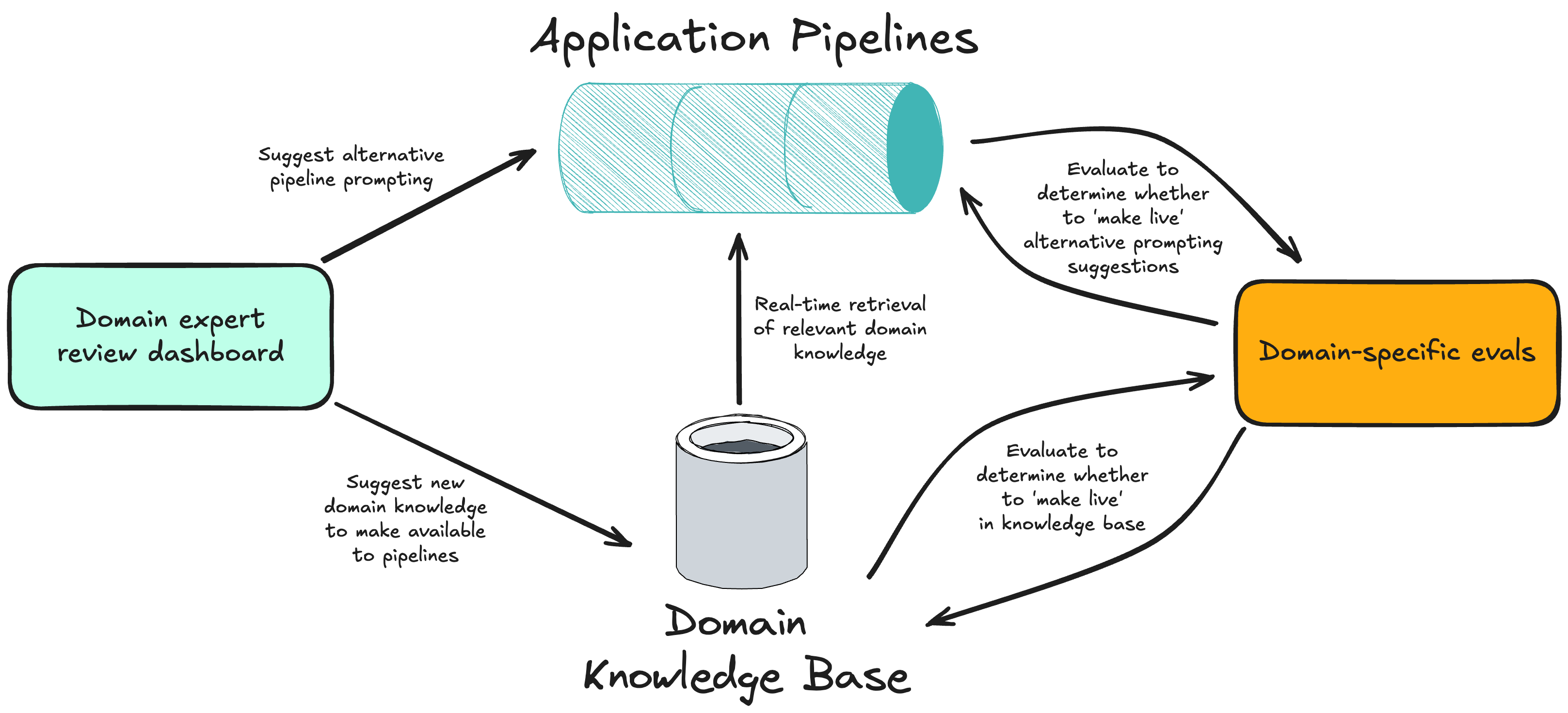
Anterior built Scalpel, a custom domain-expert review dashboard for production AI monitoring. The dashboard queues AI decisions and presents the AI output on one side, clinical context such as guidelines and medical evidence on the other, optional medical definitions in an expandable sidebar, and a structured review flow that guides clinicians from case summary to question, relevant medical record context, and AI output. Reviewers capture correctness, select failure modes from a taxonomy, add free-text suggestions for new failure modes, suggest improvements such as prompt tweaks or knowledge-base additions, tag regression cases for CI, and file bug reports with prefilled trace details. The system turns human review from a monitoring-only activity into a feedback loop for improving the LLM application.
Diagram confidence: reconstructed (reconstructed from prose).
flowchart LR
  production-ai-system[Production AI system] --> review-queue[Review queue]
  review-queue --> scalpel-dashboard[Scalpel dashboard]
  scalpel-dashboard --> context-panel[Context panel]
  scalpel-dashboard --> ai-output-panel[AI output panel]
  scalpel-dashboard --> review-flow-controller[Review flow controller]
  scalpel-dashboard --> failure-mode-taxonomy[Failure-mode taxonomy]
  scalpel-dashboard --> improvement-capture[Improvement capture]
  context-panel --> medical-definition-sidebar[Medical definition sidebar]
  review-flow-controller --> keyboard-shortcuts[Keyboard shortcuts]
  review-flow-controller --> progress-indicator[Progress indicator]
  failure-mode-taxonomy --> free-text-failure-suggestions[Free-text failure suggestions]
  improvement-capture --> prompt-updates[Prompt updates]
  improvement-capture --> knowledge-base-additions[Knowledge base additions]
  regression-dataset[Regression dataset] --> ci-test-suite[CI test suite]
  bug-report-generator[Bug report generator]
Components
| Component | Role | Interacts with |
|---|---|---|
Production AI system |
Anterior's AI product that makes clinical reasoning decisions requiring review. | Review queue |
Review queue |
Set of AI outputs, traces, and context awaiting clinician review. | Scalpel dashboard |
Scalpel dashboard |
Custom review UI optimized for high-quality, fast, actionable clinical reviews. | Context panel, AI output panel, Review flow controller, Failure-mode taxonomy, Improvement capture |
Context panel |
Right-side display for medical guidelines, medical evidence, and other required context. | Medical definition sidebar |
Medical definition sidebar |
Expandable reference panel that reduces the need for clinicians to look up definitions in separate tabs. | — |
AI output panel |
Left-side target area containing AI output information to be reviewed. | — |
Review flow controller |
Opinionated sequence guiding reviewers through case summary, AI question, medical context, and output review. | Keyboard shortcuts, Progress indicator |
Keyboard shortcuts |
Friction-reduction feature that minimizes clicking during repeated reviews. | — |
Progress indicator |
Navigation aid that helps reviewers know where they are in the review sequence. | — |
Failure-mode taxonomy |
Structured selectable categories for classifying how the LLM pipeline failed. | Free-text failure suggestions |
Free-text failure suggestions |
Open field for domain experts to propose new failure categories beyond the initial taxonomy. | — |
Improvement capture |
Review-time capture of suggested prompt, knowledge-base, or system changes. | Prompt updates, Knowledge base additions |
Prompt updates |
Potential downstream improvement generated from review findings. | — |
Knowledge base additions |
Potential downstream content change generated from review findings. | — |
Regression dataset |
Dataset of tagged review cases that can be run in continuous integration. | CI test suite |
CI test suite |
Automated regression environment for replaying selected reviewed cases. | — |
Bug report generator |
Review output path that files bugs with trace details already attached. | — |
Data flow
Production AI decisions enter a review queue with their relevant medical context, LLM trace, and AI output. A clinician opens Scalpel, reads a short case summary, understands the AI's question, inspects guideline/evidence context and optional medical definitions, then reviews the AI output. The review form records correctness, failure-mode categories, free-text additions, improvement suggestions, regression-dataset tags, and bug reports. Those structured outputs feed performance monitoring, failure-mode analysis, prompt or knowledge-base changes, historical retesting, CI regression datasets, and engineering bug triage.
4 supporting quotes
 ](https://chrislovejoy.me/assets/images/article-images”article, stated”article, stated
Why this architecture
Anterior chose a custom dashboard because production LLM review is not just data labeling; it requires the right clinical context, fast repeated workflow, and structured outputs that directly feed model and product improvement. Scalpel's split layout supports mental separation between context and AI output, the review sequence reduces cognitive overhead, and the failure/improvement capture turns expert time into regression cases, bug reports, prompt changes, and knowledge-base updates.
4 supporting quotes
 ](https://chrislovejoy.me/assets/images/article-images/pipeli”article, stated
Models used: Anterior AI system · LLM application
Scale
- Scalpel enabled a small team of clinicians to review more than 100,000 medical decisions.“enable a small team of clinicians to review >100,000 medical decisions.”article, stated
- The dashboard was organized around three principles and three review objectives.“A review dashboard should optimise for three things by following three principles:”article, stated
- Anterior split the two main context types from the AI output information.“We decided to put the two main pieces of context (guidelines and evidence) on one side of the screen”article, stated
- The review flow sequence has four explicit steps.“read short summary of case for context -> understand the question the AI was asked -> see the relevant context in medical record -> review the AI output”article, stated
Alternatives considered (roads not taken)
Use spreadsheets or generic review tooling.
Rejected because: These tools can start the process but struggle with intermediate traces, constrained views, and direct translation from review to product improvements.
Display all review context at once.
Rejected because: Clinicians need access to all relevant context, but showing everything simultaneously would overwhelm reviewers and increase cognitive load.
Anchor the review flow on existing clinician workflows.
Rejected because: Anterior found individual workflows varied widely, so it designed an opinionated review sequence from the ground up.
Collect only correctness labels.
Rejected because: Correctness tracking monitors performance but does not explain failure modes, quantify fixes, or preserve review context for improvements.
Patterns
human-in-the-loop-gate (evaluation)
Domain-expert clinicians review AI medical decisions with the necessary context before those reviews are used to assess and improve the system.
eval-driven-development (evaluation)
Scalpel converts reviews into correctness metrics, failure modes, regression datasets, and improvement suggestions that drive LLM product changes.
observability-tracing (operations)
The dashboard exposes intermediate LLM trace steps, medical context, and prefilled trace details so reviewers and engineers can inspect production behavior.
data-quality-loop (operations)
Failure taxonomy, free-text suggestions, regression tagging, and improvement capture turn clinician judgment into structured data for product iteration.
3 supporting quotes
Tradeoffs
Build a custom review dashboard.
Chose Scalpel, a domain-specific UI for clinician review over Spreadsheets or generic tooling providers.
Rationale: Custom UI was more work, but it could show intermediate traces, domain context, failure modes, and improvement actions in one workflow.
Keep context available but progressively tucked away.
Chose Nesting, sidebars, and spatial grouping over Showing all context at once.
Rationale: Reviewers need all relevant context for quality, but reducing visual and cognitive overload improves speed and consistency.
3 supporting quotes
Design an opinionated review sequence.
Chose A ground-up flow from case summary through question, record context, and AI output review over Mirroring every clinician's personal workflow.
Rationale: Existing workflows varied widely, so an optimized standard sequence could improve consistency and reduce cognitive overhead.
3 supporting quotes
Capture improvement suggestions during review.
Chose Review-time prompt, knowledge-base, regression, and bug-report feedback over Separate review and improvement phases.
Rationale: Capturing changes while the domain expert still has context increases leverage and reduces handoff loss.
Gotchas (what bit them)
Production teams can be blind to AI performance until customers leave.
Root cause: Without review metrics, teams do not know whether AI output quality has degraded or how to improve it.
Resolution: Anterior built Scalpel to collect human review metrics and convert reviews into product-development data.
3 supporting quotes
Generic review tools break down when the AI trace and context are complex.
Root cause: Spreadsheets and vendors limit data views and struggle with intermediate LLM steps.
Resolution: Anterior built a custom UI that could show the exact context, traces, and review outputs needed for clinical evaluation.
Too much available context can overwhelm reviewers.
Root cause: High-quality clinical review needs broad context, but showing it all simultaneously increases cognitive load.
Resolution: Scalpel used nesting, sidebars, and context placement to keep information available but not always visible.
Review flow friction causes fatigue, slower reviews, and lower-quality output.
Root cause: Repeated scrolling, clicking, too many choices, and unclear navigation accumulate across many clinical reviews.
Resolution: Anterior shadowed reviewers and added focus-aware information placement, keyboard shortcuts, contextual decision reveal, and progress indicators.
3 supporting quotes
Correctness labels alone do not tell teams what to fix.
Root cause: A performance score can characterize quality but not identify why the pipeline failed or which historical cases a fix should be tested on.
Resolution: The dashboard collects failure modes, free-text new categories, improvement suggestions, and regression dataset tags.
Evaluation
Scalpel itself is the evaluation system: clinicians review AI outputs with the needed context, record correctness, classify failure modes, suggest new categories, propose improvements, tag regression cases for CI, and file bug reports with traces. The dashboard supports both performance monitoring and iterative LLM product development.
Metrics: Correctness of the LLM · Performance segmented by user query type or other axes · Failure-mode categories · Historical failure-mode retest impact · Regression dataset inclusion · Bug reports with prefilled trace details · Time per review · Reviewer friction signals from shadowing
4 supporting quotes
Outcomes
- Anterior built Scalpel as a domain-expert review dashboard
- a small team of clinicians reviewed more than 100,000 medical decisions
- the review UI separated guidelines/evidence from AI output to improve mental separation
- the dashboard collected correctness, failure modes, improvement suggestions, regression cases, and bug reports
- the process created a bridge from production AI data to application improvements
Scalpel enabled a small clinical team to review more than 100,000 medical decisions. The dashboard was designed around three principles: surfacing context, optimizing review flow, and generating actionable data. The example review sequence had four steps, and regression cases could be run in CI.